Smarter Accounting Software. Sign-up for a free trial, no credit card needed!

Integrate IconCMO’s Event Calendar on the Church’s Website

Integrate IconCMO’s Event Calendar on the Church’s Website

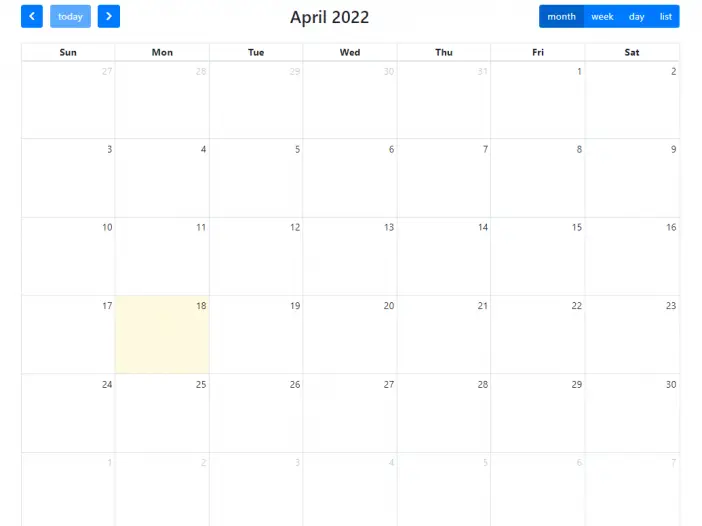
church-calendar-example

Integrating events entered into IconCMO for sermons, church gatherings, church groups, children check-in events, and so on is easy. After […]

Integrating events entered into IconCMO for sermons, church gatherings, church groups, children check-in events, and so on is easy. After entering all the church’s events under People –> Events, there is a button that says “View Calendar” that opens a new web page. This URL is what you would use on your church website to show the calendar’s events. The calendar URL would look something like the following.

Example URL: /calendar/5555555555/

With these changes, the calendar can have events where people can register for free and paid events. Also, the events allow the check-in of individuals if you need that functionality.

Checkout other IconCMO features!
Browse Related Content

Church Software Programs Introduction Church software programs specialize in reducing costs for church operations and help to grow the […]

API Introduction The Icon Church Management software API (application programming interface) gives you maximum flexibility and power by allowing you […]

Which ChMS Is Better, All-In-One or Multiple Systems? Short answer — having an all-in-one church software is the better […]

Having trouble logging in? Please call or email us.

Church members must contact the church directly for login assistance.
Make sure to use a recent version of Chrome, Firefox, Safari, or Edge.

Scroll to Top