It has been an exciting time at Icon Systems for the Development team. Today Icon Systems uploaded all new code for the entire IconCMO system to work faster on the Internet and eliminate cache issues in browsers.
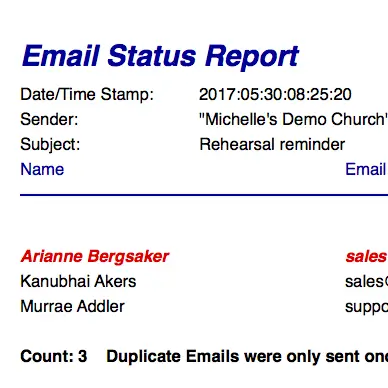
Included in this upload was additional enhancements like email history. This function is found in two areas of the system:
- People: Households
- Communications: Email History
On the household form (People: Households) there is a button called email history that will show you all the history of emails for that household and it’s members in the last 90 days. The email history window will collate all emails done on the system into one screen for that household that you are viewing. For example, it will pull in emails that were done in the groups, talents, donations, member portal security, household and individuals modules.
Additionally, under the Communications menu there is an email history screen that will collate all emails for the entire system for every household into one screen. This should be used by system administrators and other users that are privy to this type of information.
Included in this email history function is the ability to download the attachment if needed by the staff at a later date. It will also show administrators who sent the email providing a very good audit trail to ensure the emailing system is being used effectively.
User’s Tip #1: This email function can be incorporated into the visitation process for your church to ensure no one is slipping through the cracks. It can answer questions like “Did we send this visitor our welcome email?”.
User’s Tip #2: When pulling up an email in the email history you can copy the content of that email to your clip board if you would like to send that same content to another household. Once copied in the clip board go to the household or other module you want to send from and paste the content into the email screen and click send.
We hope our clients enjoy these new features!
Thank you,
Your Development team at Icon Systems!