Smarter Accounting Software. Sign-up for a free trial, no credit card needed!

Email Address Format Validation – A New Feature

Email Address Format Validation – A New Feature

church-management-software-group-email-report

We recently made a change that affects how you send emails from IconCMO. Before your email gets sent, the system […]

We recently made a change that affects how you send emails from IconCMO. Before your email gets sent, the system will verify that the email addresses are in a valid format. This feature is commonly called email address format validation. Below is what the error looks like at the bottom of the group screen.

If you get this error message

Your message was successfully sent to the valid emails on the list. Next, find out which email addresses were invalid so you can fix them on the individuals’ records.

  1. Go to People: Group –> then click the ‘Group Reports’ button.
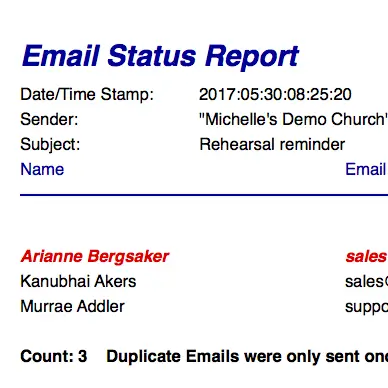
  2. Find the ‘Email Status Report’ and click on it. Then fill out the criteria for the report.
  3. Lastly click “Show Report’ button

Common Email Address Formatting Errors

  • Extra periods e.g. email@sample.com. or email@sample..com
  • No @ (at) symbol e.g. emailsample.com
  • Top level domain is missing e.g. email@sample
  • Spaces e.g. email@sample .com

For more information about proper email formats visit Wiki.
Browse Related Content

IconCMO now has CRA-compliant donation receipts MOORHEAD, MN–(Marketwired – April 25, 2017) – Icon Systems announced its IconCMO church management […]

Grab your party hat, we have exciting news for you! Over the summer, our developers have been busy enhancing the […]

Icon System’s partner VolunteerSpot recently announced they’ve changed their name to SignUp.com. VolunteerSpot has a new name and a new […]

Having trouble logging in? Please call or email us.

Church members must contact the church directly for login assistance.
Make sure to use a recent version of Chrome, Firefox, Safari, or Edge.

Scroll to Top