Pass-through accounts are established when a church collects money on behalf of an organization or event and does not want to record the money as income. These accounts are set up as liabilities instead of revenue accounts since the money will only pass-through the church to another organization.
Follow the instructions below to create liability pass-through accounts in Icon Systems.
Part 1: Setup for Pass-through Accounts
First, decide if the money can stay in the general fund or if the church wants to create a new fund. If you need a new fund, then these next steps apply. To create a new fund:
- Go to General Ledger: Accounting Funds.
- Select ‘Add a New Fund‘
- Type in the Fund Name.

Add an accounting fund for the pass-through account.
Next we need some accounts set up.
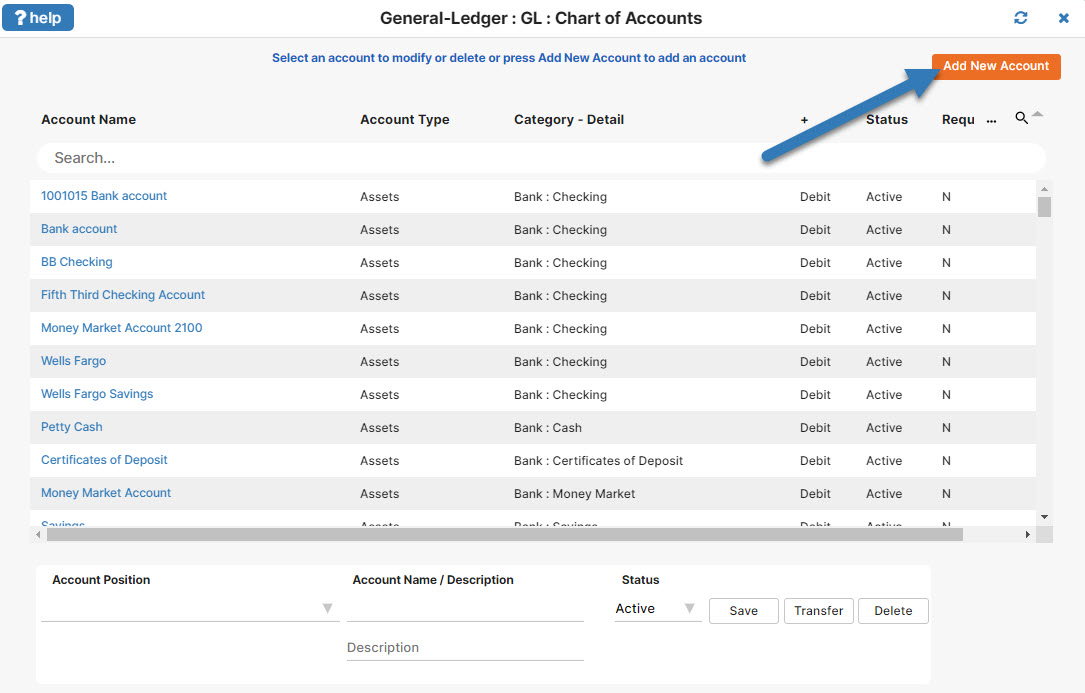
- Go to General Ledger: GL: Chart of Accounts.
- Click on the Add New Account button.
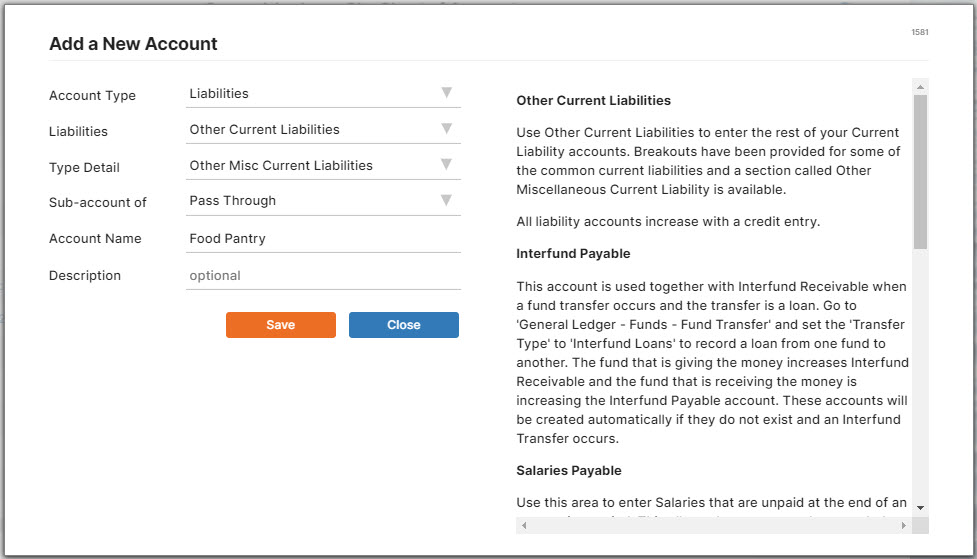
- Fill out each drop down box with these values to create the liability accounts.
- Account Type: Liabilities
- Liabilities: Other Current Liabilities
- Type Detail: Other Misc Current Liabilities
- Sub-account of: Not a sub-account
- Account Name: Pass-Through
- Then click Save.
Repeat the process for any sub-accounts you want to add under Pass-Through. I have created a sub-account called Food Pantry under my pass-through account below.
Part 2: Donation Fund Setup for these Accounts
- Go to Donations: Funds & Donations
- Click the “Add New Fund” button, and a new fund will be added to the list with a default name “A New Fund XX”, where XX is a number. You can rename the fund as you wish.
- Then fill out the drop down list for the “Accounting Fund”, “Checking (Debit)”, and “Revenue/Liability(Credit)”. Seen below.
- Accounting Fund Affected: Choose the general fund or the fund you created
- Banking – Checking
- Donation Liability – Food Pantry

If you’re looking for a good report for these accounts, go to General-Ledger: GL:GL-Reports. The Statement of Financial Position (Balance Sheet) will give you a report with all your liability account information.
Learn more about how to do fund accounting the right way at our fund accounting page. Or let us show you how simple it is with Icon Systems fund accounting. Check out a guided tour at your leisure.