
A church budget is important to most church organizations and is a highly-utilized feature in IconCMO. However, budgets can only be set for revenue and expense accounts, which can pose a problem if you want to budget for a liability account such as a mortgage.
For example, a typical Mortgage Payment of $1,000 looks like this:
- Credit Checkbook (Asset) = 1000.00
- Debit Mortgage Loan (Liability) = 800.00
- Debit Interest (Expense) = 200.00
The entries are in balance and you are able to post the check or journal entry. However, in this scenario you are only able to budget for the $200 interest expense since $800.00 of the payment goes towards your mortgage liability account.
Solution – Setup to For a Church Mortgage in the Church Budget
Go to your Chart of Accounts and create an expense account called Budget Principle, then Create a sub-account underneath it called Budget Offset. Add the corresponding entries when you make a check or create a journal entry to record a mortgage payment.
- Credit Checkbook (Asset) = 1000.00
- Debit Mortgage Loan (Liability) = 800.00
- Debit Interest (Expense) = 200.00
- Credit Budget Offset (Expense) = 800.00
- Debit Budget Principle (Expense) = 800.00
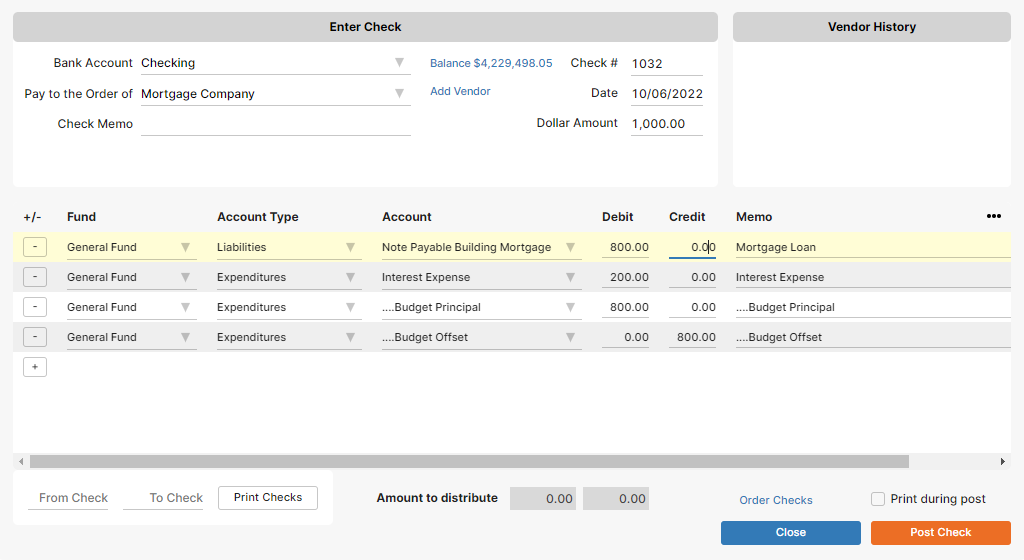
With the two additional entries, you can now budget for your mortgage principle. Budget Offset is a sub-account of Principle Expense, so it will not show on the Statement of Activities report since they offset each other.
I hope you found this helpful. If there’s any other accounting scenarios you’d like to see in future posts, please comment below! 🙂