
If you have ever wished you could create a map of your entire church membership, then we have news for you. We came across a site that is helping churches map their membership. BatchGeo allows you to map up to 250 records for free*. Keep reading for step-by-step instructions.
Export Your Address Information from IconCMO
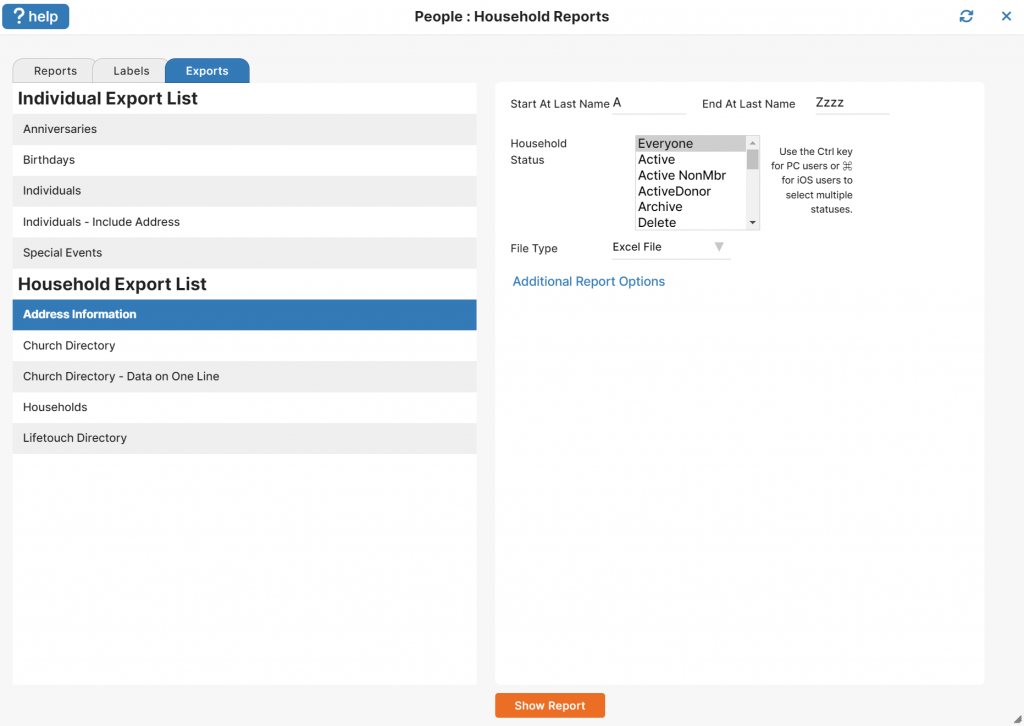
Go to People: Households.
Click on the Reports button at the bottom.
Click on the “Exports” Tab.
Choose the “Address Information” export under the ‘Household Export List’ section.
Choose the appropriate criteria.
Click the “Show Report” button.
Format the Data
Delete or hide columns A (the household names) and C. Column C is ‘Address Line 2’ which is typically reserved for things like the apartment number. This information is not needed for the map.
Insert a row at the top and add headers for the remaining columns (address, city, state, zip)
Highlight the data in columns B through F
Copy the highlighted data to your clipboard (ctrl+c)
Make the Church Membership Map
Go to http://batchgeo.com/
Paste your data into BatchGeo (ctrl+v)
Click the “Validate & Set Options” button
Review to make sure everything matches correctly
Click the “Make Map” button
You’re done!

You may notice some of the addresses in my example are not accurately mapped (e.g. a Newport, WA address showing up near Vancouver). This is because the addresses I used are completely made up and that is confusing Google Maps. When you use real addresses from your database, the map should look much better.
*Icon Systems is not affiliated with or partnered with BatchGeo. But we think it is a pretty amazing resource to know about and hope you find it helpful.
Don’t have IconCMO? Sign up for a FREE 30-day trial.