Smarter Accounting Software. Sign-up for a free trial, no credit card needed!

Fund Accounting Software for Any Size Church

Fund Accounting Software for Any Size Church

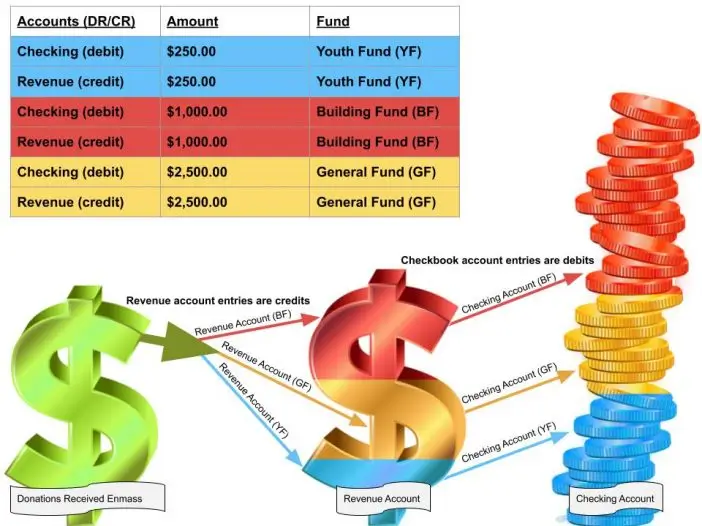
donation-received-revenue-checking-account

Fund accounting tracks all financial transactions and places them into individual categories called accounting funds. The idea behind fund accounting […]

Fund accounting tracks all financial transactions and places them into individual categories called accounting funds. The idea behind fund accounting is to get a clear picture of what’s happening financially in an organization. It’s focus is on accountability rather than profitability.

Who uses fund accounting?

A picture showing the types of organizations that use fund accounting like churches, universities, and hospitals.


Nonprofit organizations

Fund accounting is unique to nonprofit organizations such as government agencies, churches, hospitals and schools. Nonprofits receive revenue through a variety of sources; contributions or donation, rent of buildings, fees for service, grants and fund raising. Fund accounting allows the nonprofit organization to track how the money comes in and to assure money is being allocated appropriately.

Why is fund accounting important to nonprofits?


Tax Exempt Status

Nonprofit organizations are exempt from Federal income tax and other taxes. To maintain their exempt status, organizations must remain compliant. That’s where the Financial Accounting Standards Board (FASB) comes in. The Financial Accounting Standards Board (FASB) is a private, not-for-profit organization that was founded in 1973 to develop generally accepted accounting principles (GAAP) within the United States. An important element of these principles is that nonprofits should track funds to properly honor donors’ wishes

What is a fund?

A fund allocates money for a specific purpose

A fund isn’t just the checkbook. It includes any accounts, from the COA, it uses to conduct its business; assets, liabilities, revenues and expenses. Assets and liabilities carry a balance forward each year. Revenue and expense accounts only show how much money was taken in and spent each year. Revenue and expense accounts do not hold money and their balance is zero at the beginning of each year. Each fund is a self balancing set of accounts which allows organization to set money aside and budget with a particular purpose. Each fund can produce a statement of financial position with the equation assets minus liabilities equals net assets. For profit companies refer to net assets as equity.

Statement of Financial Position

Types of accounting funds

Unrestricted

Unrestricted funds can be used for any purpose. These funds can be transferred out at any time. Example: An Unrestricted General fund can give part of its cash to another fund, such as the Building Fund.

Restricted

Restricted funds are permanently restricted and can only be used for that particular funds purpose. Example: An organization may have a fund raising event with money collected to be given to a specified charity. After expenses for the fund raising event are posted, all remaining fund money must be given to the charity.

Chart of accounts

There are 4 types of accounts.

ALL accounts are available to ALL funds. Fund accounting breaks down the organization into individualized funds to track revenue and expenses and to maintain a proper balance for each fund in one checkbook (asset) account.

  • Assets – hold the money
  • Liabilities – show debt owed
  • Expenses – show how money went out
  • Revenues – show how money came in

Debits and credits

Does debit mean minus?

Because we use debit cards to purchase items, we often think debit means minus. When we return something we receive a credit which implies credit means plus. This isn’t the case. Debits and credits react differently depending on the type of account you are using.

What is double entry accounting?

Double entry accounting is when you use at least 2 accounts within the COA. You need to have a debit and credit for each transactions. For example, not only do you credit your checkbook when paying the phone bill, but you also debit the telephone expense account. The credit lowers the balance in your checkbook and the debit increases the expense account. To balance debits and credits must always equal each other.

Required Reports

A true fund accounting system has unique reports.

Knowing which accounts within the chart of accounts (COA) belong on financial statements can help a user greatly in any accounting system, especially in Fund Accounting. For example, assets and liabilities hold a balance and therefore they show up on the Statement of Financial Position or Balance Sheet. Revenues and expenditures accounts do not carry a balance from year to year so they are never shown on the Balance Sheet report but instead are shown on the Statement of Activities (P/L) report.

Read more about financial statements and account types and their balances.

Before you purchase fund accounting software

Ask yourself….

  • Will the software provide a comprehensive set of reports needed by auditors and board members?
  • Will you be in compliance with FASB requirements?
  • Is the system designed for churches/nonprofits, or is it a for-profit accounting system?
  • Will the system save you time and money?
  • Does the accounting system allow for donor-designated restrictions on funds?
  • Does the donation system link to the accounting system?
  • And finally does the software follow the guidelines in the e-book — fund accounting for church leadership.

Nonprofit Year-End Checklist

Save end-of-year stress and headaches. Download our year-end checklist– essential for all nonprofit organizations.


Read the Church Leadership e-book

We’ve published an e-book on church fund accounting: Fund Accounting for Church Leadership.

Browse Related Content

A full version of the IconCMO church software can be accessed on the iPad & Android tablets through our web […]

Church Finance 101 Get the eBook series that explains everything a church needs to know about recording donations, gifts in kind (non-cash […]

Donations Integrate with membership, pledges & accounting. Powerful, easy-to-use contribution module.   Integrate with eGiving platforms like Vanco payment processing. Track […]

Having trouble logging in? Please call or email us.

Church members must contact the church directly for login assistance.
Make sure to use a recent version of Chrome, Firefox, Safari, or Edge.

Scroll to Top